Fork & Timeline
spwn gives you two ways to move through a session’s history: Fork to branch into a new session, and the Timeline to return the current one to an earlier point.
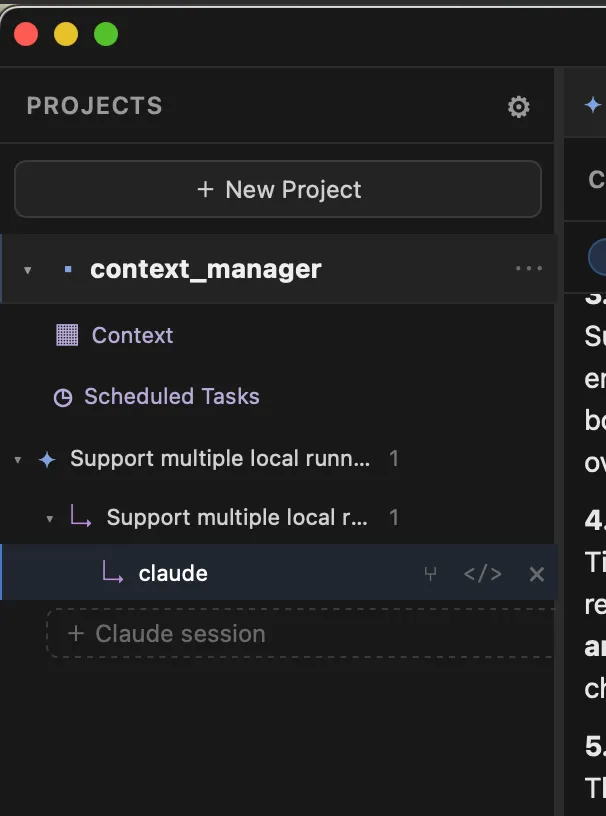
⑂ Fork branches a session into a new one, opened in its own tab and shown nested under the original in the sidebar so you can see where it came from.
Use Fork when you want to try a different direction without abandoning the conversation you have — both sessions continue to exist and run independently. It’s ideal for “what if we tried it this other way?” moments: branch, explore, and keep whichever result you like.
In a git project, the fork also gets its own git branch, created from the parent session’s branch — so its files start where the parent left off and then diverge. See Branches & Merging.
Timeline
Section titled “Timeline”The Timeline (a tab in a session’s Inspector) is where you return a session to an earlier point. spwn captures a checkpoint — a copy-on-write snapshot of the session’s files — after each turn, so the Timeline can take you back precisely.
Use the ↺ Return here action on a turn, then choose what to roll back:
- the conversation only,
- the files only, or
- both.
Use the Timeline when a session has gone down an unproductive path and you’d rather back up and retry than start over.
How they differ
Section titled “How they differ”| Fork | Timeline (Return here) | |
|---|---|---|
| Effect | Creates a new session branched from a point | Rolls the current session back |
| Original session | Kept, runs in parallel | Rolled back in place |
| Scope | Conversation + branched code | Conversation, files, or both |
| Use it when | You want to explore an alternative and keep both | You want to back up and retry |